TarvosTool: Debug Tool for Tarvos-e Radio Modules
C++ desktop tool for configuring Tarvos-e radio modules, decoding their serial protocol and testing the radio link through a chat on Windows and macOS.
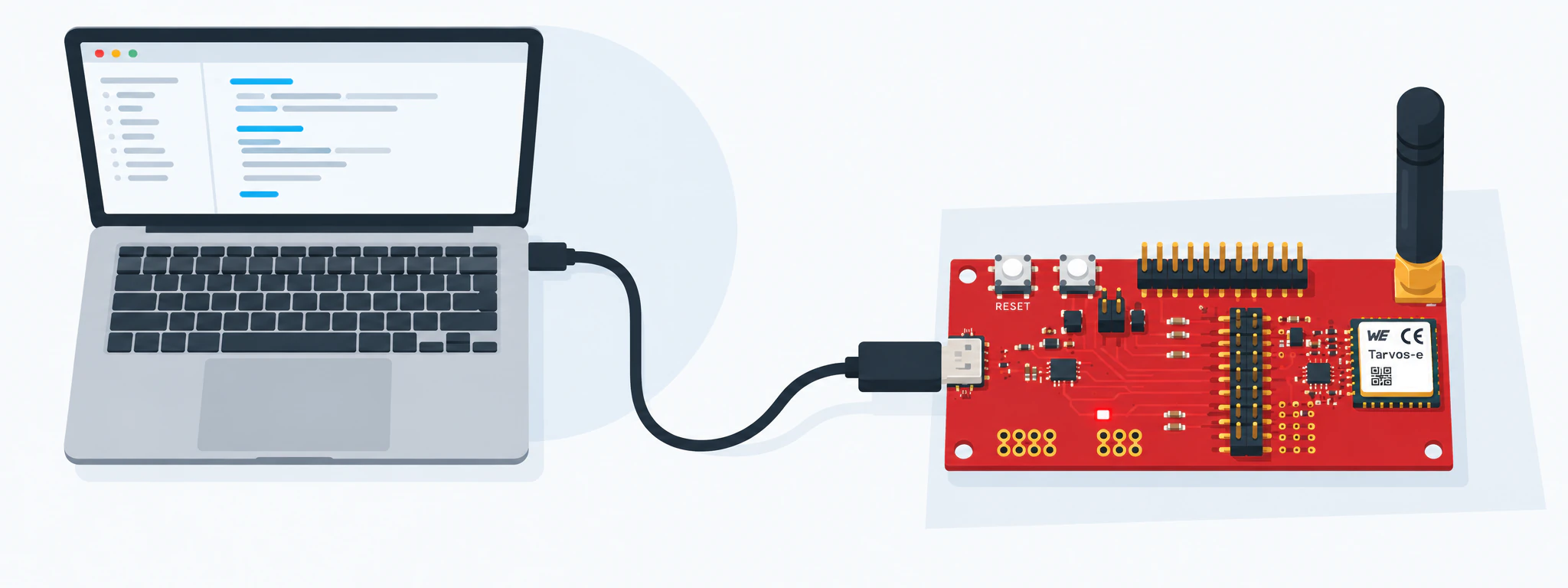
- Designed and developed the C++17 / wxWidgets application, protocol layer and serial back ends for Windows and macOS
- Implemented all 14 documented request commands and access to 22 user settings, with frame previews and input validation
- Made serial traffic readable through timestamped hex logs with decoded commands, responses and radio data
- Built a radio chat and verified bidirectional messaging between two physical modules connected to Windows and macOS
- Checked the protocol layer against the manufacturer's example frames and released the tool under the MIT license
Context
While developing with a Würth Elektronik Tarvos-e radio module on the manufacturer’s evaluation kit, I needed a practical way to control it from my computer and understand its responses.
The module uses a binary UART protocol. Even a simple test involves command codes, address fields and an XOR checksum. Repeatedly looking these up and interpreting hex dumps made the debugging process cumbersome.
I built TarvosTool to bring command building, protocol inspection and radio-link testing into one desktop application.
My Role
I designed and implemented the complete C++17 / wxWidgets application: the user interface, protocol builder and parser, settings validation, request handling, radio chat and platform-specific serial communication.
I also set up the CMake build and GitHub Actions workflow for Windows and macOS, and brought the original command tool and its private chat extension into a single public repository.
Technical Challenge
The protocol’s outer frame is simple, but its contents depend on the module’s state. Four address modes change the layout of outgoing and incoming messages, while the RF profile determines the permitted payload size.
The tool also has to respect the module’s operating rules: one request at a time, restricted commands after a stored setting is changed, and no commands in transparent mode. Values written to user settings are not validated by the module itself, so an incorrect value can make it unreachable.
The challenge was to make those rules usable while keeping the actual bytes visible for debugging.
Solution
Commands and Responses in One View
The main window combines the serial connection, communication log and Command Builder. Every sent and received frame appears as raw hex alongside a timestamped description of its command, status and payload.
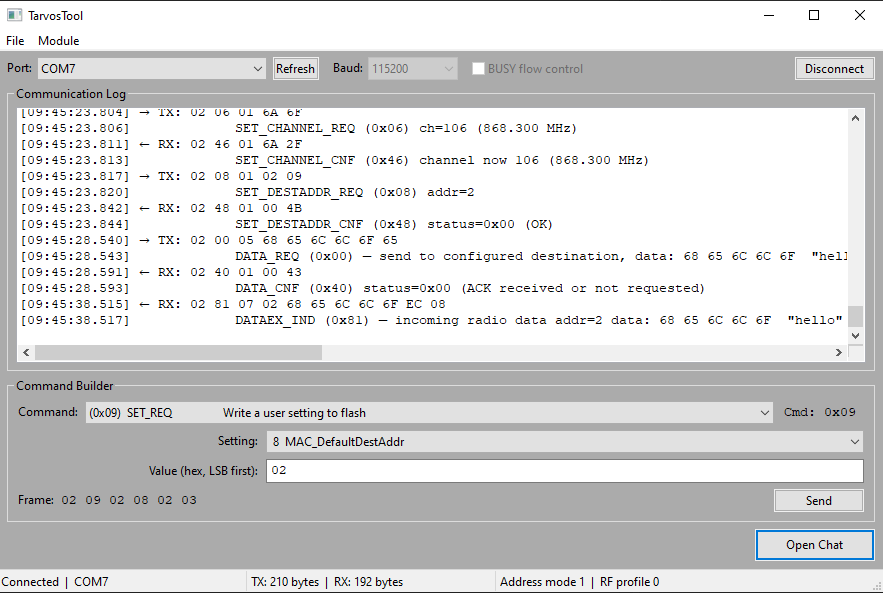
The frame preview shows what will be sent; the log shows what the module actually returned.
The builder supports all 14 documented request commands and provides a picker for 22 user settings. Fields and validation adapt to the command and address mode. The application reads the address mode and RF profile on connect and after a restart, and refuses address-dependent transmissions while the required mode is unknown.
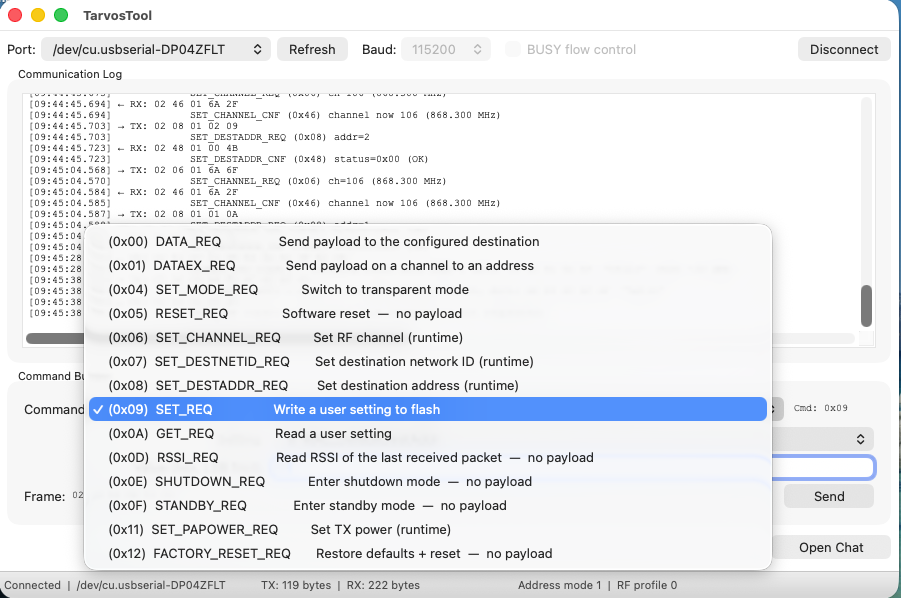
Command names, codes and purposes are available directly in the interface.
Size and range checks reject invalid settings before transmission. Flash writes, factory reset and disruptive mode changes require confirmation, while the request queue enforces the module’s command sequencing.
Radio-Link Testing Through Chat
Each module has its own connection window and optional chat. The chat sends text over the radio, reports delivery failures and displays received messages with sender information and signal strength. Channel and destination controls use temporary runtime settings, avoiding flash writes for each change.
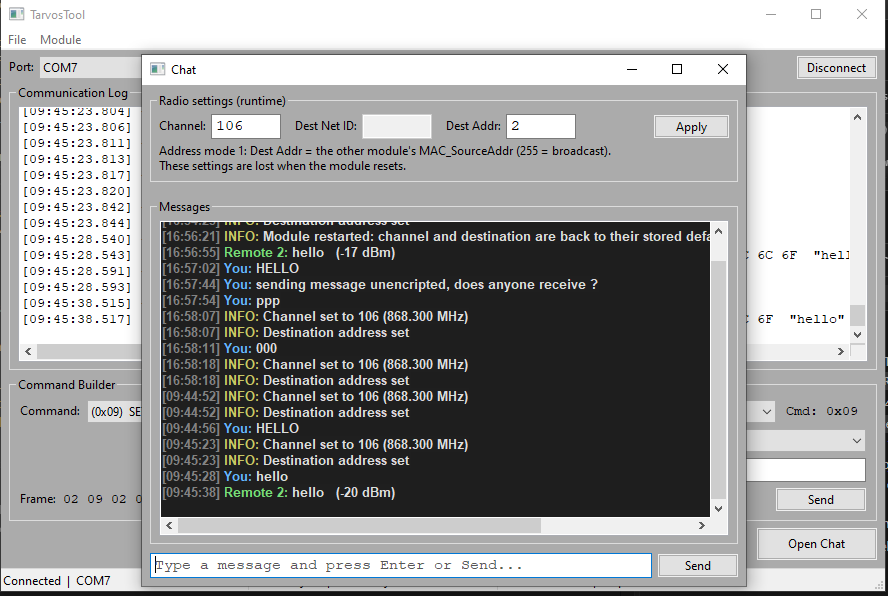
The chat turns individual protocol operations into a practical test of the complete radio link.
Shared Protocol, Native Serial Interfaces
The application separates the interface, protocol logic and serial transport. The protocol layer has no GUI code or I/O, so it can be compiled and checked independently. Serial communication uses POSIX termios on macOS and the Win32 communications API on Windows.
Each main window owns its port, parser, request queue and module state, allowing several modules to run independently on the same computer.
Impact
TarvosTool provides a repeatable workflow from configuring a module to inspecting a received radio message, with the protocol details available at every step.
I verified bidirectional communication using two physical modules, one connected to a Windows PC and one to a Mac. The screenshots show an addressed exchange on channel 106, including the received text and signal strength.
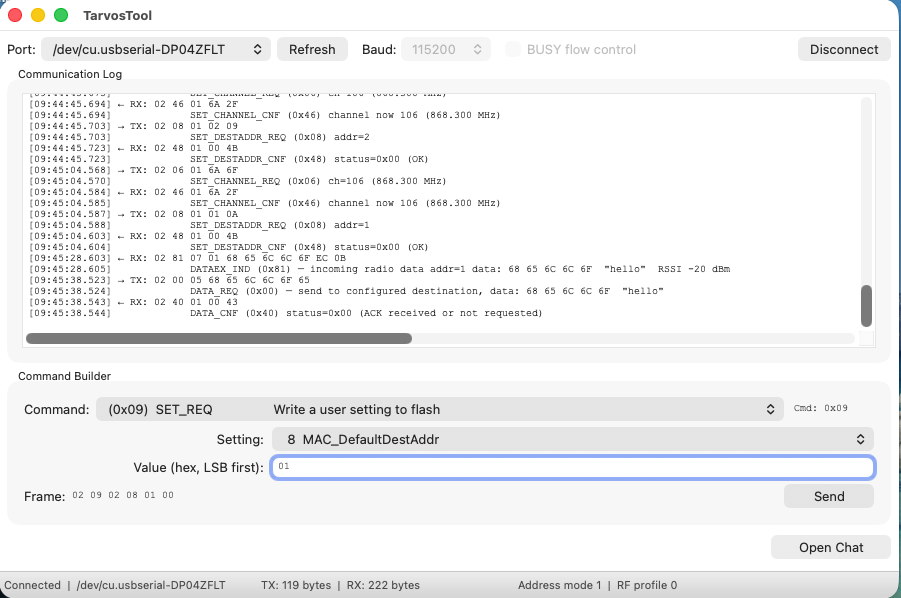
The Mac side of the hardware test: incoming radio data and the reply are visible in the same log.
The protocol layer also passed 23 offline checks against examples and rules from the manufacturer’s manual, covering frame building, parsing, address handling and settings validation. The Intel Mac build and BUSY-to-CTS wiring on the evaluation kit remain unverified; the engineering article covers the current limits in more detail.
The tool is released under the MIT license, making the application and its protocol implementation available for others working with Tarvos-e modules.
Technologies
C++17 wxWidgets CMake GitHub Actions POSIX termios Win32 Serial API UART WE-ProWare Tarvos-e FTDI VCP
Read the engineering article →
Source code: github.com/fsm-fawzifansa/TarvosTool (MIT license).
TarvosTool is an independent project. It is not affiliated with or endorsed by Würth Elektronik. Tarvos-e and WE-ProWare are names of their respective owners.